How to charge the Jet Bot
You can charge the Jet Bot manually or allow it to return automatically to the Clean Station for charging.
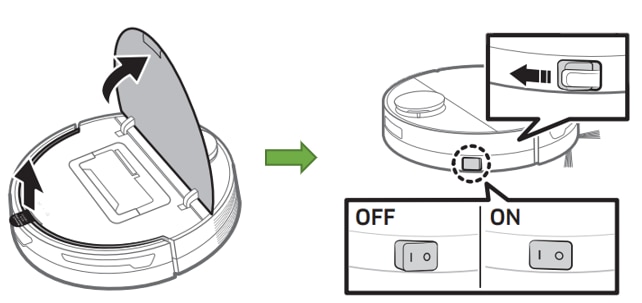
Step 1. Open the upper cover of the Jet Bot.
Step 2. Remove the white gasket.
Step 3. Remove the yellow gasket from the power switch.
Step 4. Press the power switch to turn on the Jet Bot.
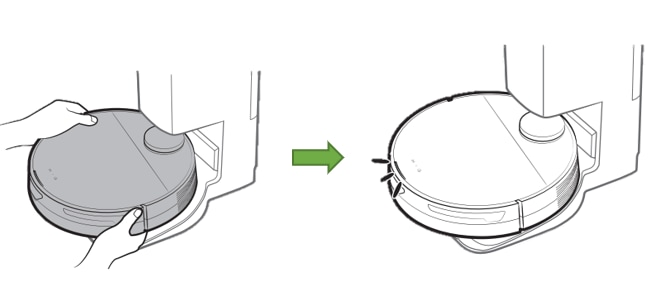
Step 5. Place the Jet Bot on the Clean Station, ensuring the charging terminals are aligned.
Step 6. Check the status indicator as it changes from red to green while charging.
Note: When turning on the Jet Bot for the first time, check the SmartThings app connection.
Step 1. Allow the Jet Bot to return automatically to the Clean Station after cleaning.
Step 2. Press the Home button or use the SmartThings app to send it back manually if needed.
Note: The Jet Bot returns to charge when cleaning is complete, the dustbin is full, or the battery is low.
Thank you for your feedback!
Please answer all questions.