What are the new features in Samsung One UI 4.0

Samsung One UI 4.0 introduces a range of new features designed to enhance privacy, customization, and usability. With improved privacy controls, personalized color schemes, and updated apps and widgets, One UI 4.0 offers a more intuitive and secure user experience.
1. Enhanced Privacy Controls
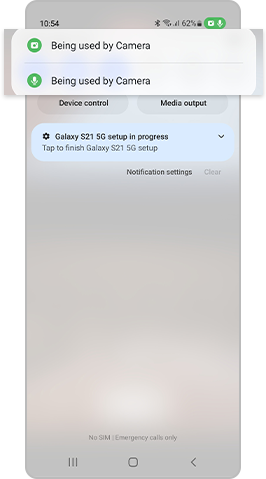
One UI 4.0 strengthens privacy protection with real-time monitoring of app access to your camera and microphone. You can view detailed usage logs from the last 24 hours and manage app permissions efficiently.
- Go to Settings and select Privacy.
- Enable Camera Access and Microphone Access to monitor app usage.
- Swipe down with two fingers to access Quick Settings and tap the green icon above it to see all apps currently using your camera and microphone.
2. Customizable Widgets
Widgets have been redesigned for easier access and better usability. You can customize widgets on your Home screen by pressing and holding anywhere on the Home screen, then tapping the Widgets button at the bottom of the screen.
-Select or drag the widgets you want to use to enable the feature.
3. New Emojis and GIFs
One UI 4.0 offers a variety of new emojis, GIFs, and stickers for free. These expressive options are available directly from the keyboard, making it easier to personalize your chats.
4. Improved Camera Functionality
The updated Camera app allows you to quickly capture high-quality pictures and videos. The user-friendly menu layout enhances convenience, and the zoom setting display has been changed from icons to numbers for clearer understanding of the zoom magnification level.
5. Picture in Picture (PIP) Feature
The PIP feature is useful for watching videos while multitasking. From the Home screen, you can easily adjust the size and location of the PIP screen by dragging any of its four corners outward to your desired settings.
Supported Samsung Galaxy Devices
One UI 4.0 is compatible with a range of Samsung Galaxy devices, including the Galaxy S series, Galaxy Z Fold, Galaxy Z Flip, and Galaxy A series. Ensure your device is eligible for the update by checking the official Samsung support page.
Related Samsung Support Topics

Thank you for your feedback!
Please answer all questions.